GitLab 18.7 Release

GitLab 18.7 released with improved GitLab Duo analytics dashboard and secret validity checks

GitLab 18.7 released with improved GitLab Duo Analytics dashboard and secret validity checks, AI-powered model chat selection and much more!

Today, we are excited to announce the release of GitLab 18.7 with improved GitLab Duo Analytics dashboard, improved secret validity checks, model selection for chat and agents, and much more!

These are just a few highlights from the 25+ improvements in this release. Read on to check out all of the great updates below.

To the wider GitLab community, thank you for the 169 contributions you provided to GitLab 18.7! At GitLab, everyone can contribute and we couldn't have done it without you!

To preview what's coming in next month’s release, check out our What's new page.

GitLab Notable Contributor badge

Notable Contributor This month's Notable Contributor is awarded to David Aniebo

We’re excited to recognize David Aniebo as our 18.7 Notable Contributor for his impactful contributions to GitLab product planning capabilities and the contributor platform.

David’s work on improving work item list functionality demonstrates his technical expertise and dedication to enhancing the user experience for GitLab planning features. This contribution helps teams better organize and manage their work items, making project planning more efficient for thousands of GitLab users.

Beyond code contributions, David has been a consistent supporter of the contributor platform, helping to improve the experience for community contributors. His collaborative approach and responsiveness have earned praise from multiple team members across different groups.

“David has done some fantastic work helping out with some Product Planning group efforts, and we are very thankful for his contributions,” shared Nick Brandt, Engineering Manager for Product Planning.

Thank you, David, for your valuable contributions to GitLab and for being such a collaborative member of our community! We look forward to your continued involvement.

18.7 Key improvements released in GitLab 18.7

Secret validity checks improved and generally available

Secret validity checks improved and generally available

stage-badge
GitLab.com
Self-Managed
GitLab Dedicated
GitLab Dedicated for Government

When a valid secret is leaked in one of your repositories, you must react quickly. To help you prioritize urgent threats, validity checks automatically verify whether leaked credentials can still be used.

In GitLab 18.7, we’ve improved:

  • Vendor integrations: Integrated with Google Cloud, AWS, and Postman, along with existing support for GitLab tokens.
  • Report filtering: Filter the Vulnerability Report by validity status (active, inactive, possibly active) to quickly triage and prioritize secret findings.
  • Group-level API: Turn on validity checks across all projects in a group with a single API call and streamline rollout across your organization.

In this release, validity checks are generally available.

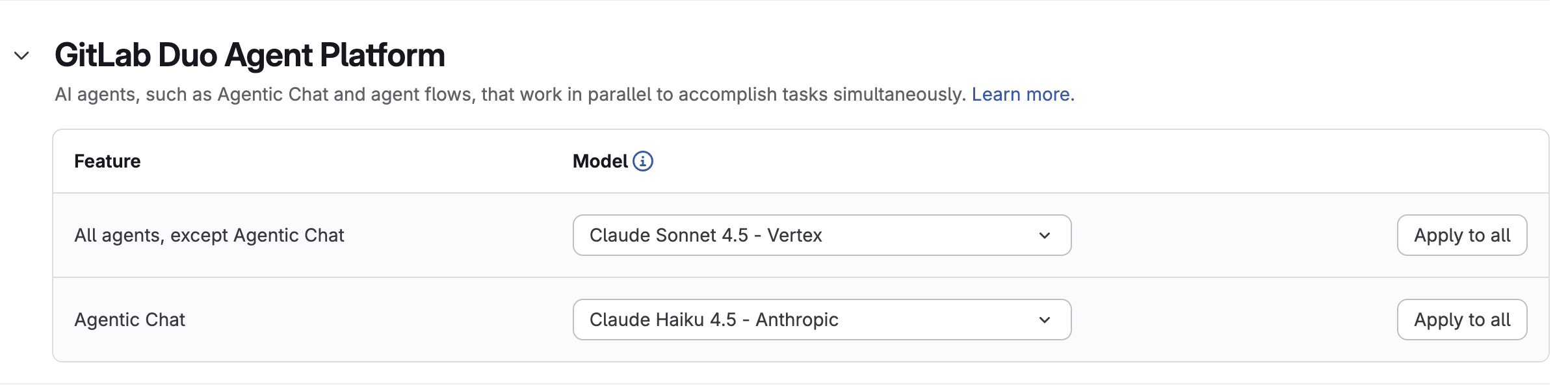
Separate model selection for Agentic Chat and agents

Separate model selection for Agentic Chat and agents

Separate models can now be selected for Agentic Chat and for all other agents for top-level groups or instances. This provides more options for model selection for GitLab Duo Agent Platform.

Separate model selection for Agentic Chat and agents

The GitLab Duo and SDLC trends dashboard delivers improved analytics capabilities to measure the impact of GitLab Duo on software delivery. The dashboard now provides 6-month trend analysis across GitLab Duo feature adoption, pipeline performance, and common development metrics such as deployment frequency and mean time to merge.

You can now track code generation volumes and IDE or language trends for GitLab Duo Code Suggestions, and observe as your teams adopt new GitLab Duo Agent Platform flows. Enhanced user-level metrics enable teams to gain deeper insight into the key Duo features providing continuous value.

A new endpoint for instance-level AI usage is now available for instance administrators to extract all Duo data from either Postgres (3-month retention) or ClickHouse.

Powered by the ClickHouse integration, this dashboard delivers sub-second query performance across millions of data points. For self-managed instances, see improved recommendations and configuration guidance for ClickHouse integration.
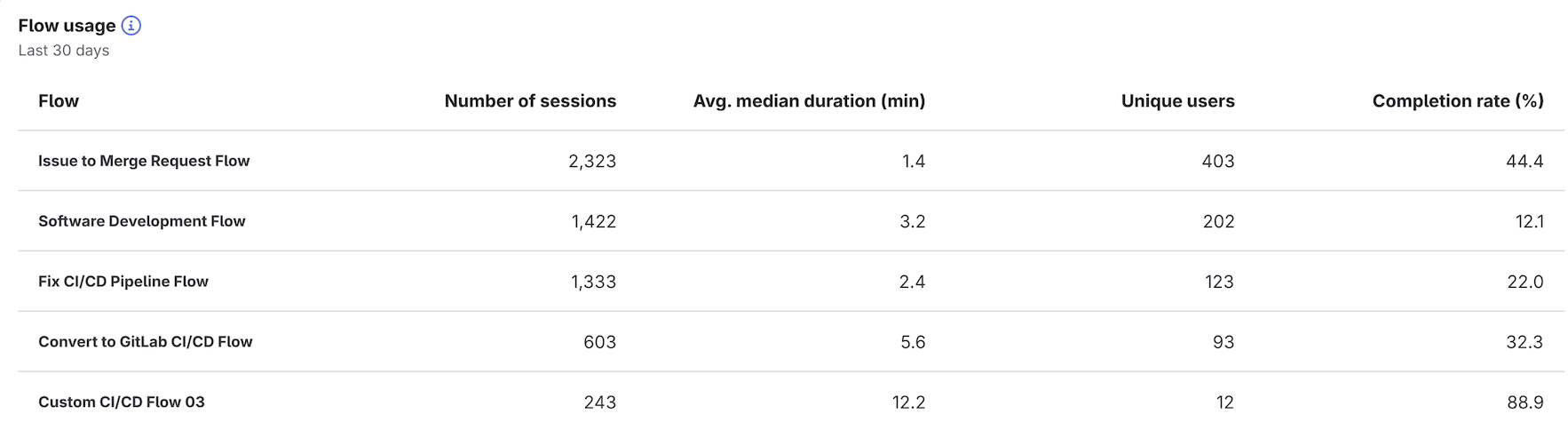
Improved GitLab Duo and SDLC trends dashboard

Additional Planner Agent features available in beta

Additional Planner Agent features available in beta

The Planner Agent now includes create and edit features in beta! The Planner Agent is a foundational agent built to support product managers directly in GitLab. Use the Planner Agent to create, edit, and analyze GitLab work items.

Instead of manually chasing updates, prioritizing work, or summarizing planning data, the Planner Agent helps you analyze backlogs, apply frameworks like RICE or MoSCoW, and surface what truly needs your attention. It’s like having a proactive teammate who understands your planning workflow and works with you to make better, more efficient decisions.

Please provide your feedback in issue 576622.
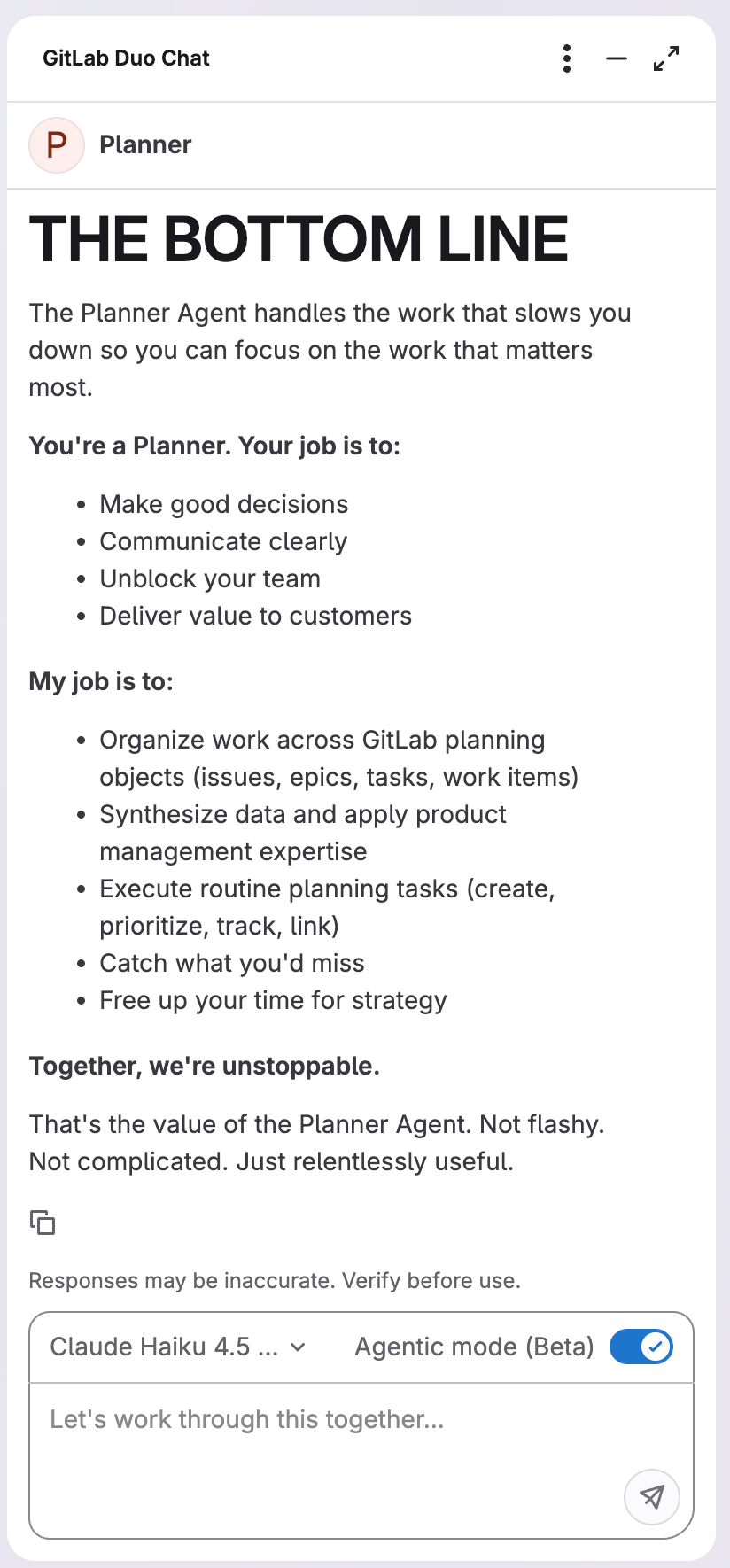
Additional Planner Agent features available in beta

Dynamic input options in CI/CD pipelines

Dynamic input options in CI/CD pipelines

stage-badge
GitLab.com
Self-Managed
GitLab Dedicated
GitLab Dedicated for Government

You can set up your CI/CD pipelines to make use of dynamic input selection when creating new pipelines through the intuitive web interface.

Now, with dynamic input options, you can configure your pipelines so that input selection options update dynamically based on previous selections. For example, when you select an input in one dropdown list, it automatically populates a list of related input options in a second dropdown list.

With CI/CD inputs, you can:

  • Trigger pipelines with pre-configured inputs, reducing errors and streamlining deployments.
  • Enable your users to select different inputs than the defaults from dropdown menus.
  • Now have cascading dropdown lists where options dynamically update based on previous selections.

This dynamic capability enables you to create more intelligent, context-aware input configurations that guide you through the pipeline creation process, reducing errors and ensuring only valid combinations of inputs are selected.

SAST False Positive Detection with AI (Beta)

SAST False Positive Detection with AI (Beta)

Security teams often spend significant time investigating SAST findings that turn out to be false positives, diverting attention from genuine security risks.

In GitLab 18.7, we’re introducing AI-powered SAST False Positive Detection to help teams focus on the vulnerabilities that matter. When a security scan runs, GitLab Duo automatically analyzes each Critical and High severity SAST vulnerability to determine the likelihood that it’s a false positive.

The AI assessment appears directly in the vulnerability report, giving security engineers immediate context to make faster, more confident triage decisions.

Key capabilities include:

  • Automatic analysis: False positive detection runs automatically after each security scan with no manual triggering required.
  • Manual trigger option: Users can manually trigger false positive detection for individual vulnerabilities on the vulnerability details page for on-demand analysis.
  • Focused on high-impact findings: Scoped to Critical and High severity vulnerabilities to maximize signal-to-noise improvement.
  • Contextual AI reasoning: Each assessment includes an explanation of why the finding may or may not be a true positive, based on code context and vulnerability characteristics.
  • Seamless workflow integration: Results surface directly in the vulnerability report alongside existing severity, status, and remediation information.

This feature is available as a free beta for Ultimate customers and must be enabled in your group or project settings. We welcome your feedback in issue 583697.
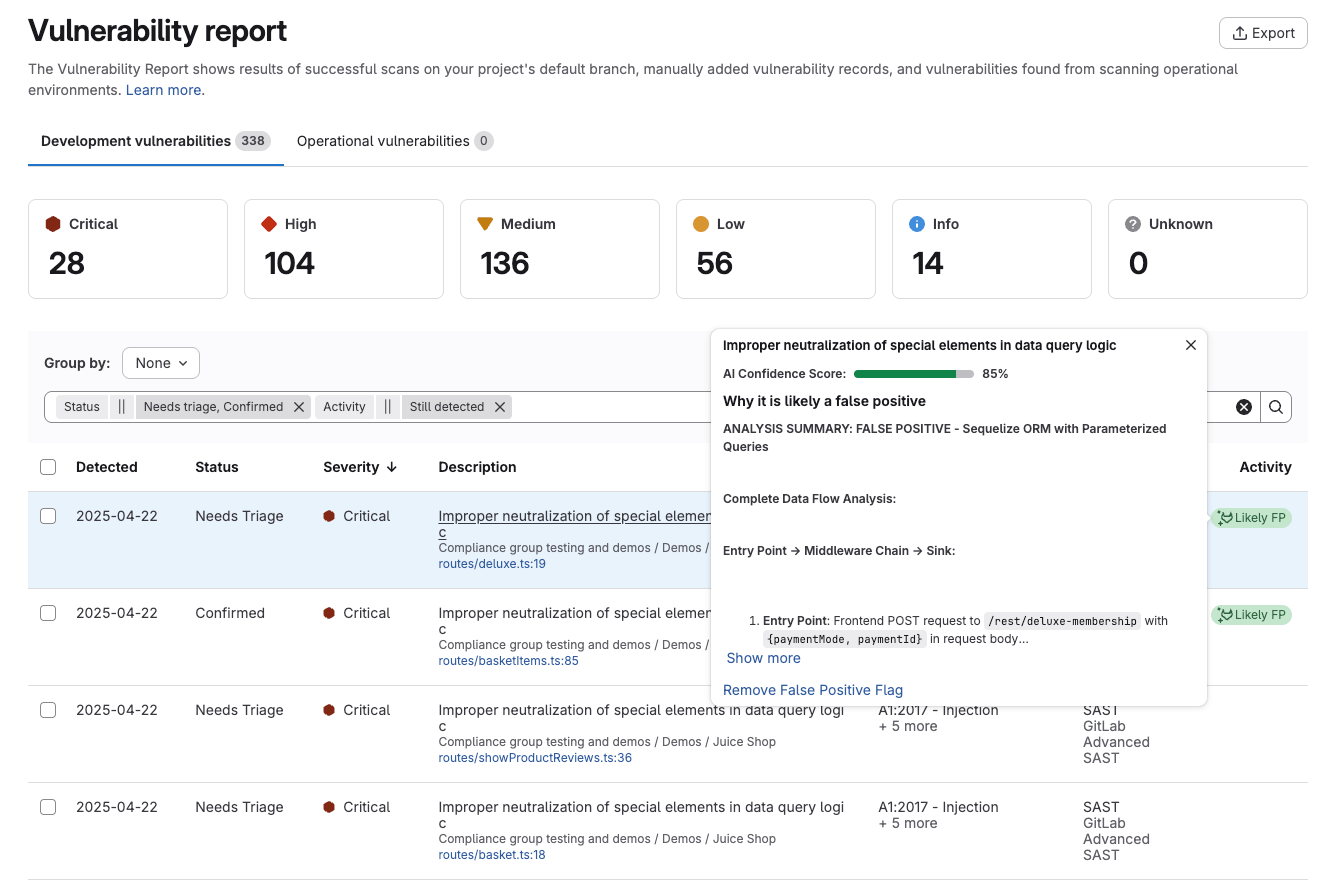
SAST False Positive Detection with AI (Beta)

New security dashboards enabled by default

New security dashboards enabled by default

stage-badge
GitLab.com
Self-Managed
GitLab Dedicated
GitLab Dedicated for Government

The new security dashboards have been updated and modernized. The dashboards were previously available on GitLab.com, and are now enabled by default on GitLab Dedicated and GitLab Self-Managed.

The new features include:

  • A vulnerabilities over time chart that supports:
    • Filtering based on project or report type.
    • Grouping by report type and severity.
    • Direct links to vulnerabilities in the vulnerability report.
  • A risk score module that calculates the estimated risk for a group or project based on a GitLab algorithm.

Please note that using the new dashboard requires ElasticSearch.
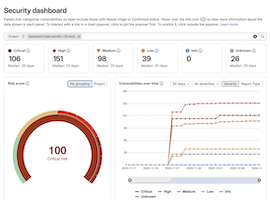
New security dashboards enabled by default

Instance setting to control publishing of components to the CI/CD Catalog

Instance setting to control publishing of components to the CI/CD Catalog

stage-badge
GitLab.com
Self-Managed
GitLab Dedicated
GitLab Dedicated for Government

Administrators of GitLab Self-Managed and GitLab Dedicated can now restrict which projects are allowed to publish components to the CI/CD Catalog. This new setting enables organizations to maintain a curated, trusted CI/CD Catalog by controlling what components can be published.

Administrators can now specify an allowlist of projects authorized to publish components. When the allowlist is populated with projects, only those projects can publish components. This prevents unauthorized or unapproved components from cluttering the list of published components and ensures all components meet organizational standards and security requirements.

This addresses a key governance challenge for enterprise customers who want to maintain control over their CI/CD component ecosystem while enabling their teams to discover and reuse approved components.
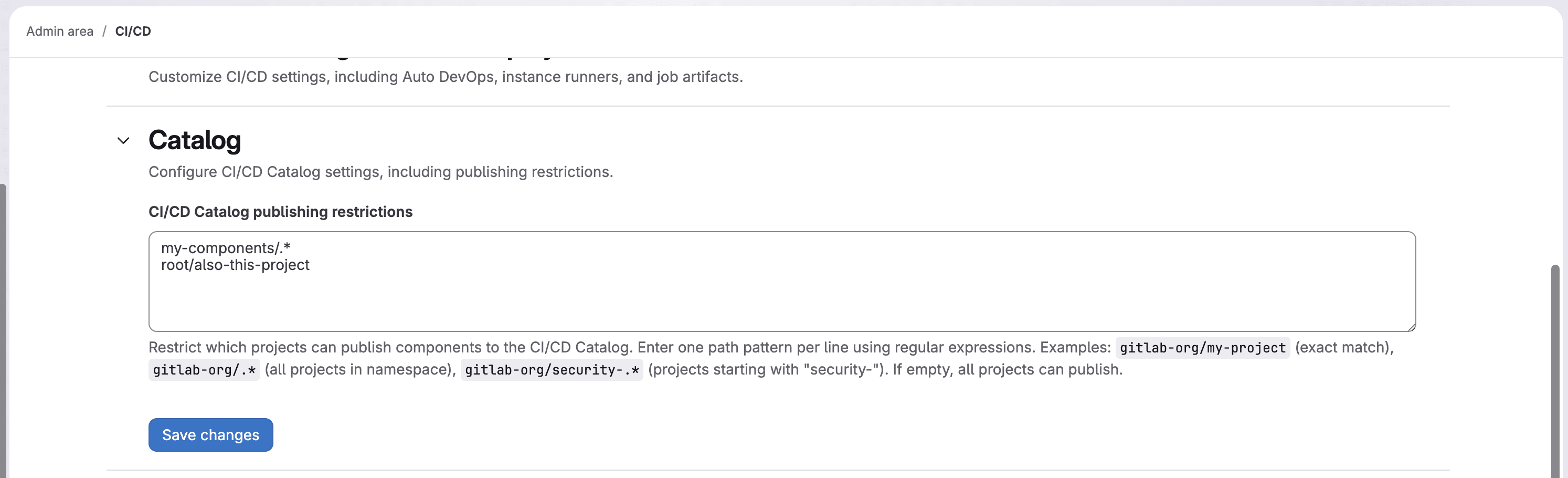
Instance setting to control publishing of components to the CI/CD Catalog

18.7 Other improvements in GitLab 18.7

stage-badge
GitLab.com
Self-Managed
GitLab Dedicated
GitLab Dedicated for Government

Heading anchor links now announce with the same text as their corresponding heading, improving the experience for screen reader users. The links also appear after the heading text, providing a cleaner visual presentation.

These changes make it easier for all users to understand and navigate to specific sections of documentation, issues, and other content.

View child pipeline reports in merge requests

View child pipeline reports in merge requests

stage-badge
GitLab.com
Self-Managed
GitLab Dedicated
GitLab Dedicated for Government

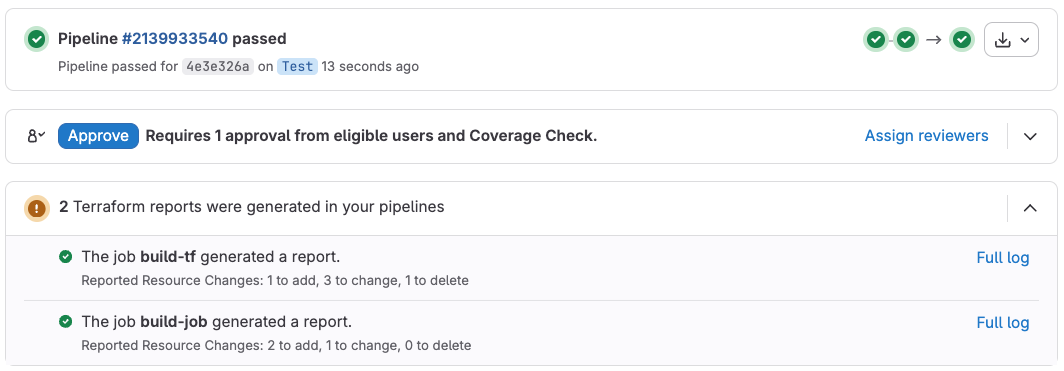
Teams using parent-child CI/CD pipelines previously had to navigate through multiple pipeline pages to check test results, code quality reports, and infrastructure changes, disrupting their merge request review workflow.

You can now view and download all reports in a unified view, including unit tests, code quality checks, Terraform plans, and custom metrics, without leaving the merge request.

This eliminates context switching and accelerates merge request velocity, giving teams the ability to deliver features faster without compromising quality.

View child pipeline reports in merge requests

Warn mode in merge request approval policies

Warn mode in merge request approval policies

stage-badge
GitLab.com
Self-Managed
GitLab Dedicated
GitLab Dedicated for Government

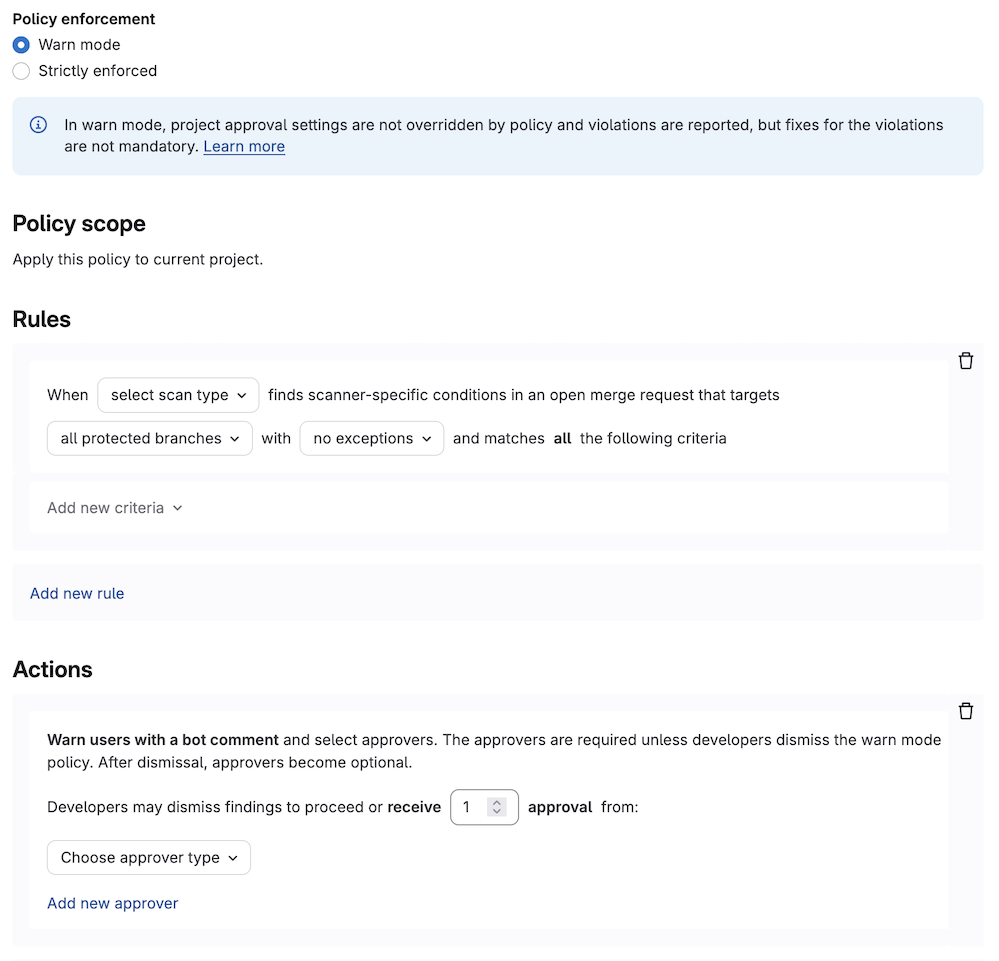
Security teams can now use warn mode to test and validate the impact of security policies before applying enforcement or to roll out soft gates for accelerating your security program. Warn mode helps to reduce developer friction during security policy rollouts, while continuing to ensure detected vulnerabilities are addressed.

When you create or edit a merge request approval policy, you can now choose between warn or enforce enforcement options.

Policies in warn mode generate informative bot comments without blocking merge requests. Optional approvers can be designated as points of contact for policy questions. This approach enables security teams to assess policy impact and build developer trust through transparent, gradual policy adoption.

Clear indicators in merge requests tell users when policies are in warn or enforce mode, and audit events track policy violations and dismissals for compliance reporting. Developers can bypass scan finding and license policy violations by providing a reasoning for the policy dismissal, creating a collaborative feedback loop between developers and security teams for more effective policy enablement.

When policy violations are detected on a project’s default branch, policies identify vulnerabilities that violate the policy in the vulnerability reports for projects and groups. The dependency list for projects also displays badges that indicate license compliance policy violations.

Additionally, you can use the API to query a filtered list of policy violations on the default branch in a project.

Warn mode in merge request approval policies

Filter and comment on compliance violations

Filter and comment on compliance violations

stage-badge
GitLab.com
Self-Managed
GitLab Dedicated
GitLab Dedicated for Government

The compliance violations report provides a centralized view of all compliance violations across your organization’s projects. The report displays comprehensive details about control violations, related audit events, and enables teams to track violation statuses effectively.

In GitLab 18.7, we’ve introduced powerful filtering capabilities to help you quickly find the violations that matter most. You can now filter by:

  • Status
  • Project
  • Control

Teams can now also collaborate directly on resolving violations through comments. Within the violation record itself, teams can:

  • Tag team members for investigation
  • Discuss remediation approaches
  • Document findings—all within the violation record itself.

Together, these features evolve the compliance violations report into a dynamic collaboration platform, enabling organizations to efficiently discover, analyze, and resolve compliance violations in their groups and projects.

Enhanced active trial experience for Self-Managed

Enhanced active trial experience for Self-Managed

stage-badge

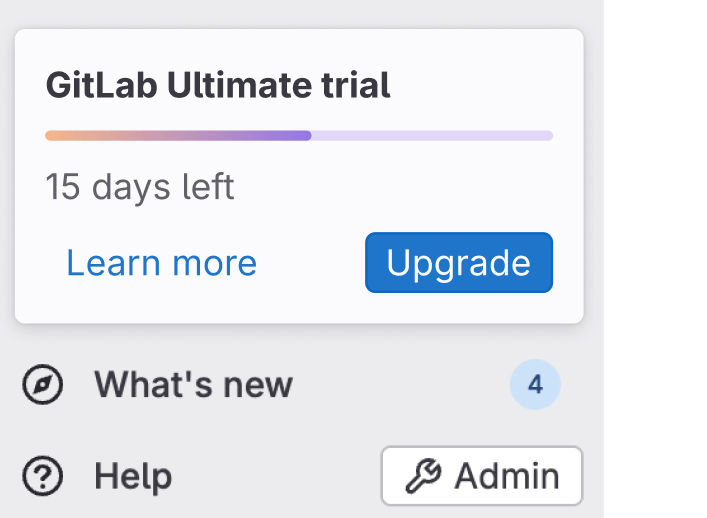
GitLab Self-Managed users on an Ultimate trial can now access their active trial status, remaining days, accessible features, and expiration notifications from the left sidebar.

These enhancements help eliminate confusion about trial duration and make it easier to evaluate paid features before purchase.

Enhanced active trial experience for Self-Managed

AI gateway timeout setting

AI gateway timeout setting

stage-badge

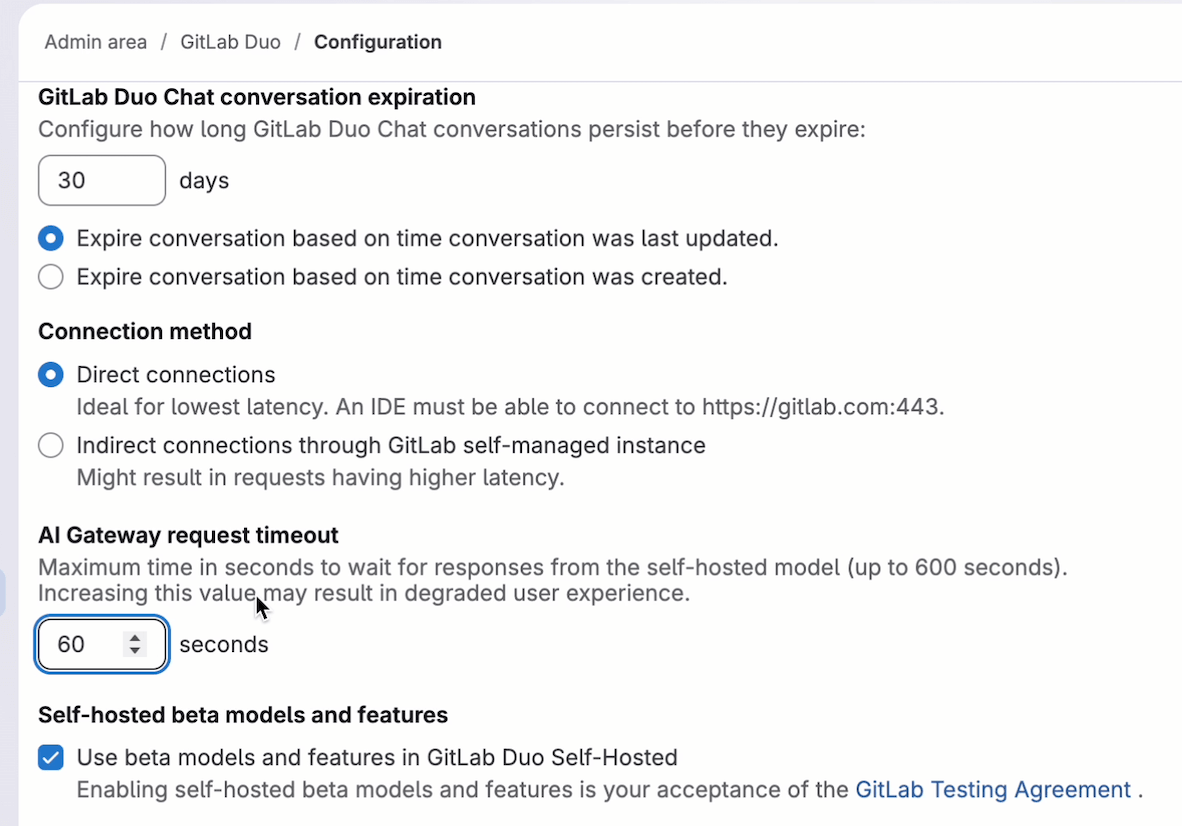
For GitLab Duo Self-Hosted, you can now configure a timeout value for requests to self-hosted models.

This value can range from 60 to 600 seconds.

AI gateway timeout setting

Configure foundational agent availability

Configure foundational agent availability

stage-badge
GitLab.com
Self-Managed
GitLab Dedicated
GitLab Dedicated for Government

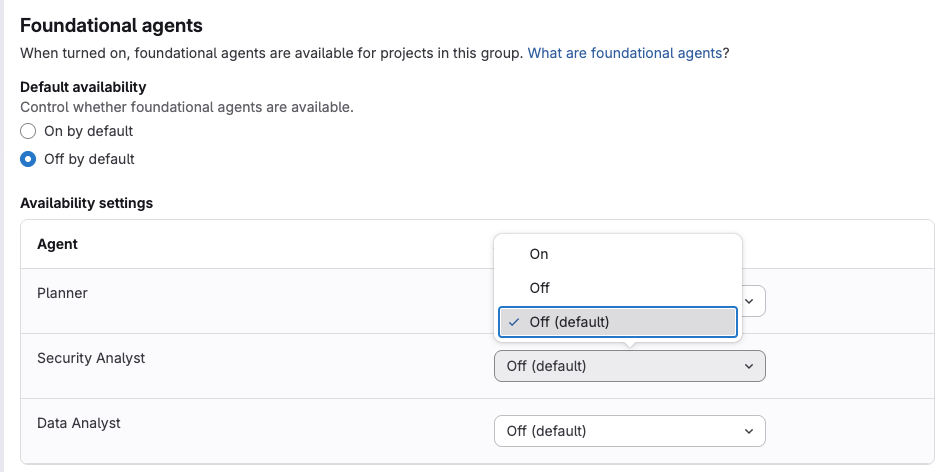
You can now control which foundational agents are available in your top-level group or instance.

Turn all foundational agents on or off by default, or toggle individual agents to align with your organization’s security and governance policies.

Configure foundational agent availability

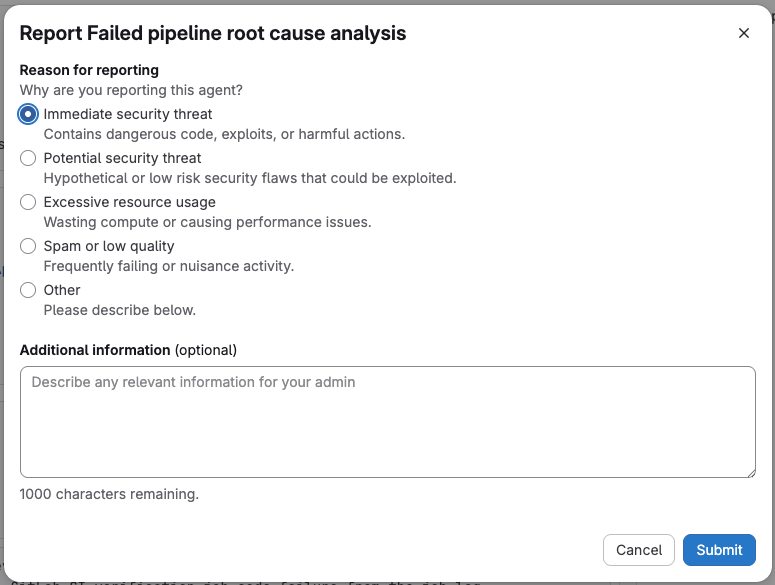
Report agents and flows to administrators

Report agents and flows to administrators

stage-badge

You can now report agents and flows to instance administrators when you encounter problematic content. Submit an abuse report that includes your feedback, and an administrator can choose to hide or delete the harmful item.

Use this feature to keep your agents and flows safe across your entire organization.

Report agents and flows to administrators

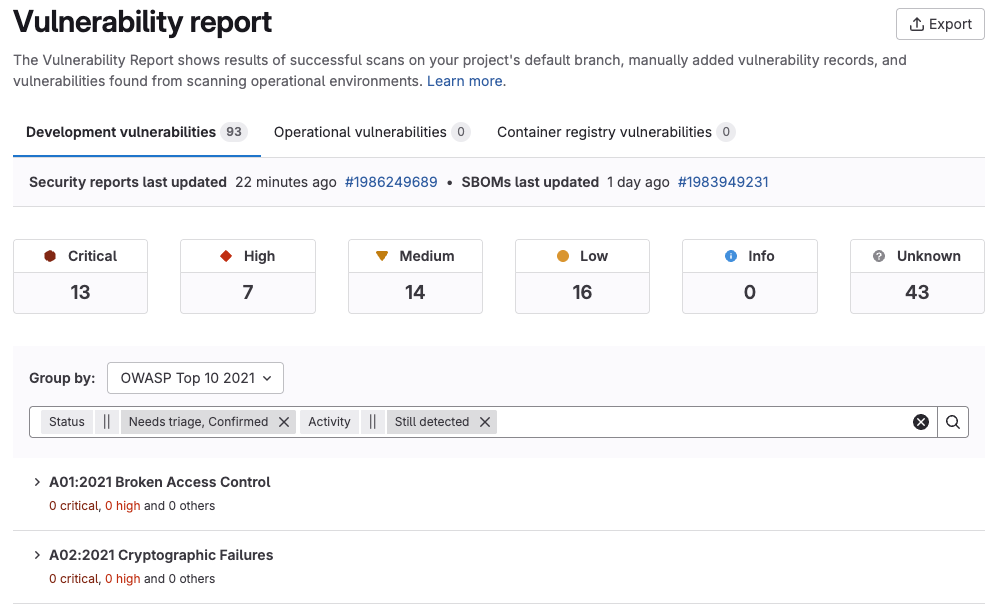
Advanced vulnerability management available in Self-Managed and Dedicated environments

Advanced vulnerability management available in Self-Managed and Dedicated environments

stage-badge
GitLab.com
Self-Managed
GitLab Dedicated
GitLab Dedicated for Government

Advanced vulnerability management is available to all Ultimate customers and includes the following features:

  • Grouping data by OWASP 2021 categories in the vulnerability report for a project or group.
  • Filtering based on a vulnerability identifier in the vulnerability report for a project or group.
  • Filtering based on the reachability value in the vulnerability report for a project or group.
  • Filtering by policy violation bypass reason.
Advanced vulnerability management available in Self-Managed and Dedicated environments

Compliance framework controls show accurate scan status

Compliance framework controls show accurate scan status

stage-badge
GitLab.com
Self-Managed
GitLab Dedicated
GitLab Dedicated for Government

GitLab compliance controls can be used in compliance frameworks. Controls are checks against the configuration or behavior of projects that are assigned to a compliance framework.

Previously, controls related to scanners (for example, checking if SAST is enabled) required your projects to have a passing pipeline in the default branch before the compliance centre displayed the success or failure status of your controls.

In GitLab 18.7, we have changed this behavior to show whether your controls have succeeded or failed based solely on scan completion, regardless of the overall pipeline status. This helps ease confusion because the compliance status of your controls reflects whether security scans ran and completed, not whether the entire pipeline passed.

Service accounts available during trials on GitLab.com

Service accounts available during trials on GitLab.com

stage-badge

Service accounts are now available during trial periods, allowing you to test automation and integration workflows before purchasing.

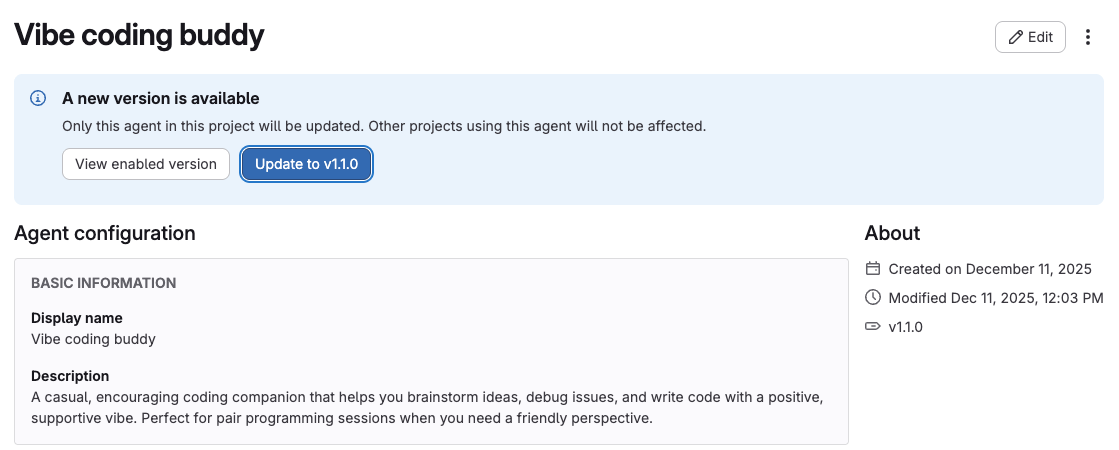
AI agent and flow versioning

AI agent and flow versioning

stage-badge

When you enable an agent or flow from the AI Catalog in your project, GitLab now pins it to a specific version.

This means your AI-powered workflows stay stable and predictable even as catalog items evolve, so you can test and validate new versions before you upgrade.

AI agent and flow versioning

Advanced search available for both merge request descriptions and comments

Advanced search available for both merge request descriptions and comments

stage-badge
GitLab.com
Self-Managed
GitLab Dedicated
GitLab Dedicated for Government

Advanced search now returns matching results from both merge request descriptions and comments. Previously, users had to search merge request descriptions and comments separately.

This improvement provides a more streamlined and comprehensive search workflow for GitLab merge requests.

Data Analyst foundational agent powered by GLQL (Beta)

Data Analyst foundational agent powered by GLQL (Beta)

The Data Analyst Agent is a specialized AI assistant that helps you query, visualize, and surface data across the GitLab platform. It uses GitLab Query Language (GLQL) to retrieve and analyze data, then provides clear, actionable insights about your projects.

You can find example prompts and use cases in the documentation.

This agent is currently in beta status, so please share your thoughts in the feedback issue to help us improve and provide insight into where you’d like to see this go next.

Support for AGENTS.md with GitLab Duo Chat (Agentic) in IDEs

Support for AGENTS.md with GitLab Duo Chat (Agentic) in IDEs

GitLab Duo Chat now supports the AGENTS.md specification, an emerging standard for providing context and instructions to AI coding assistants.

Unlike custom rules that are only available to GitLab Duo, AGENTS.md files are also available for other AI coding tools to use. This makes your build commands, testing instructions, code style guidelines, and project-specific context available to any AI tool that supports the specification.

GitLab Duo Chat in your IDE automatically applies available instructions from AGENTS.md files in your repository, set at the user or workspace level. For monorepos, you can place AGENTS.md files in subdirectories to provide tailored instructions for different components.

Bug fixes, performance improvements, and UI improvements

Bug fixes, performance improvements, and UI improvements

At GitLab, we’re dedicated to providing the best possible experience for our users. With every release, we work tirelessly to fix bugs, improve performance, and enhance UI. Whether you’re one of the over 1 million users on GitLab.com or using our platform elsewhere, we’re committed to making sure your time with us is smooth and seamless.

Click the links below to see all the bug fixes, performance enhancements, and UI improvements we’ve delivered in 18.7.

Deprecations Deprecations

New deprecations and the complete list of all features that are currently deprecated can be viewed in the GitLab documentation. To be notified of upcoming breaking changes, subscribe to our Breaking Changes RSS feed.

Removals and breaking changes Removals and breaking changes

The complete list of all removed features can be viewed in the GitLab documentation. To be notified of upcoming breaking changes, subscribe to our Breaking Changes RSS feed.

Changelog Changelog

Please check out the changelog to see all the named changes:

Installing Installing

If you are setting up a new GitLab installation please see the download GitLab page.

Updating Updating

Check out our update page.

Questions? Questions?

We'd love to hear your thoughts! Visit the GitLab Forum and let us know if you have questions about the release.

GitLab Subscription Plans GitLab Subscription Plans

  • Free

    Free-forever features for individual users

  • Premium

    Enhance team productivity and coordination

  • Ultimate

    Organization wide security, compliance, and planning

Try all GitLab features - free for 30 days

We want to hear from you

Enjoyed reading this blog post or have questions or feedback? Share your thoughts by creating a new topic in the GitLab community forum.

Share your feedback

Take GitLab for a spin

See what your team could do with The DevSecOps Platform.

Get free trial

Have a question? We're here to help.

Talk to an expert
Edit this page View source