These are just a few highlights from the 10+ improvements in this release. Read on to check out all of the great updates below.
To the wider GitLab community, thank you for the 119 contributions you provided to GitLab 18.8!
At GitLab, everyone can contribute and we couldn't have done it without you!
To preview what's coming in next month’s release, check out our What's new page.
This month’s Notable Contributor is Wesley Yarde for building a foundational new feature that allows organizations to disable SSH keys for their enterprise users.
Wesley’s contribution stands out for several reasons:
Security and compliance: This feature enables organizations to enforce SSH key requirements and enhance security across their enterprise.
Foundational work: With no existing implementation to follow, Wesley had to collaborate extensively with the GitLab team to define requirements and architecture from scratch.
First contribution: Remarkably, this was Wesley’s first contribution to GitLab—demonstrating exceptional ability to navigate a complex codebase and tackle a challenging feature.
Enables future development: This work establishes the foundation for similar features like instance-level SSH key disabling and service account controls.
The implementation spanned multiple merge requests (!205020, !210482) with thorough review cycles. Despite the complexity, Wesley demonstrated outstanding collaboration and patience throughout the process.
“It was a pleasure to collaborate with Wesley on this feature request! While both the contributor and reviewers may have felt that the review process was overwhelming, both sides showed understanding and superb collaboration to ensure the implementation is solid and complete.” — Bogdan Denkovych, who nominated Wesley for this recognition.
Congratulations Wesley, and thank you for this valuable contribution to GitLab!
GitLab Duo Agent Platform is now generally available, bringing agentic AI orchestration
across your entire software development lifecycle. Unlike AI tools that speed up individual
tasks in isolation, the Agent Platform helps teams coordinate AI agents across
planning, building, securing, and shipping software, closing the gap between faster
individual work and the collaborative, multi-stage reality of software delivery.
The platform provides a central AI Catalog where teams can discover, manage, and share
agents and flows across their organization. Built-in foundational agents like Planner, Security Analyst,
and Data Analyst handle structured work at key decision points, while customizable flows
automate multi-step agents and tasks in development workflows
from issue to merge request, CI/CD migration, pipeline
troubleshooting, and code reviews.
With governance controls, usage visibility, and flexible deployment options including
self-hosted models for offline environments, organizations can adopt AI at scale with
the transparency and control they need.
GitLab Premium and Ultimate users can start using the Agent Platform today on GitLab.com and
GitLab Self-Managed instances with promotional GitLab Credits.
The Planner Agent is now generally available! The Planner Agent is a foundational agent built to support product managers directly in GitLab.
Use the Planner Agent to create, edit, and analyze GitLab work items. Instead of manually chasing updates, prioritizing work, or summarizing planning data, the Planner Agent helps you analyze backlogs, apply frameworks like RICE or MoSCoW, and surface what truly needs your attention. It’s like having a proactive teammate who understands your planning workflow and works with you to make better, more efficient decisions.
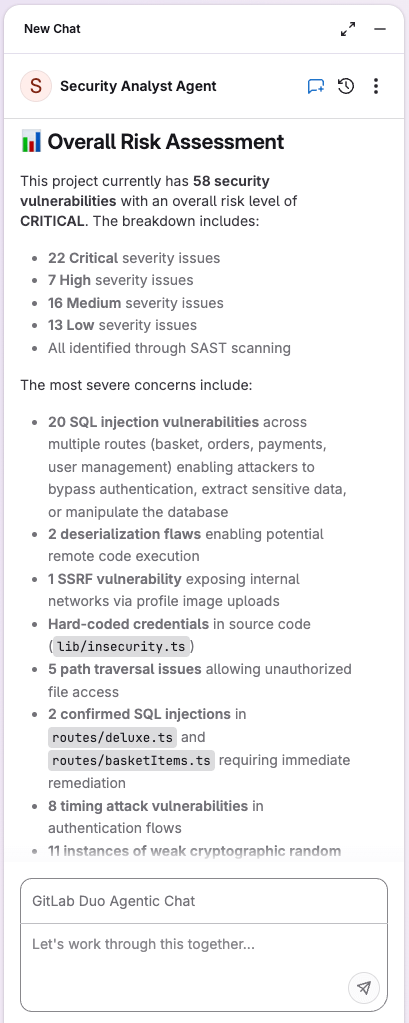
The Security Analyst Agent enables engineers to manage vulnerabilities through natural language commands in GitLab Duo Agentic Chat. Instead of manually clicking through vulnerability dashboards or writing custom scripts for bulk operations, security teams can now triage, assess, and provide guidance for vulnerabilities in Chat conversations.
As a foundational agent, the Security Analyst Agent is available by default in GitLab Duo Agentic Chat, with no manual setup required.
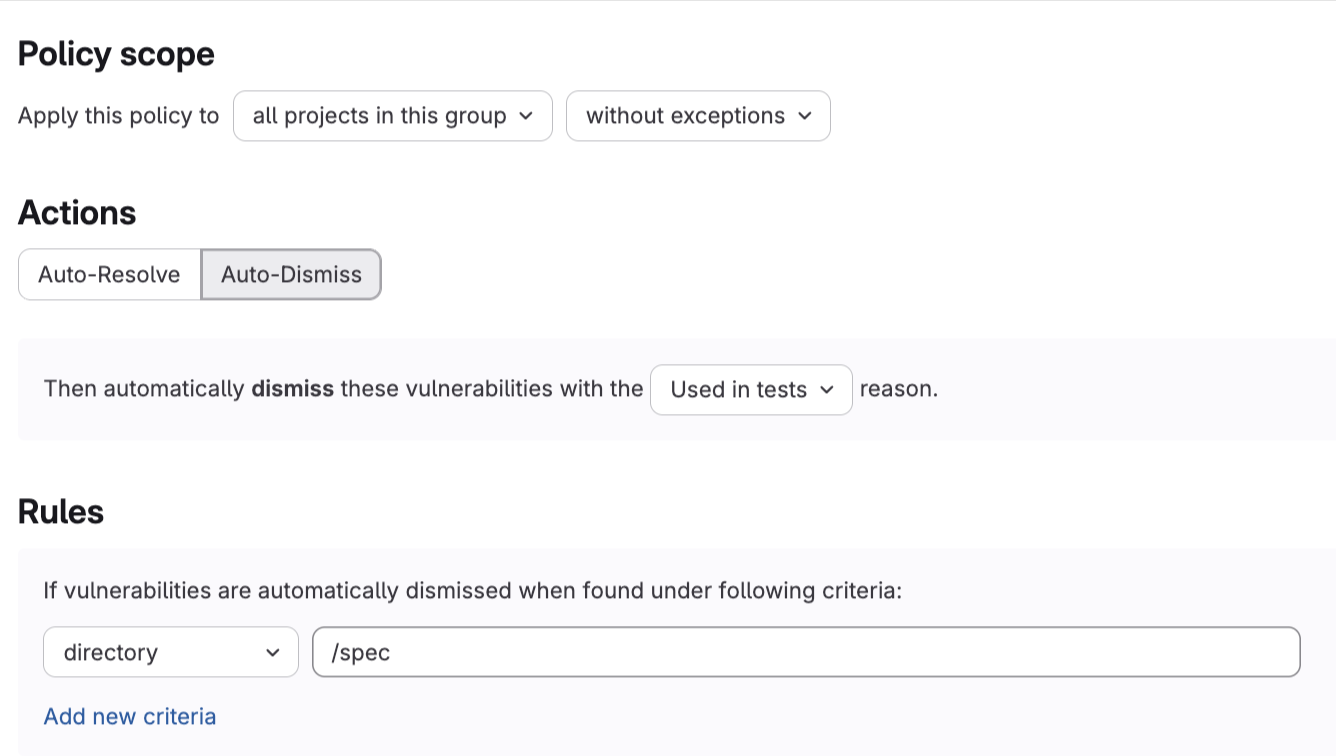
Security teams can now automatically dismiss vulnerabilities that don’t apply to their organization using vulnerability management policies. Dismissing vulnerabilities that are not relevant to your organization reduces noise and helps developers focus on vulnerabilities that pose actual risk.
You can create policies to auto-dismiss vulnerabilities based on:
File path
Directory
Identifier (CVE, CWE, or OWASP)
Auto-dismissed vulnerabilities appear in the merge request’s security widget with an Auto-dismissed label and are tracked in the vulnerability report activity with a dismissal reason for audit purposes.
We’re also releasing GitLab Runner 18.8 today! GitLab Runner is the highly-scalable build agent that runs your CI/CD jobs and sends the results back to a GitLab instance. GitLab Runner works in conjunction with GitLab CI/CD, the open-source continuous integration service included with GitLab.
Group Owners can now disable SSH keys for all enterprise users in their group. When disabled, users cannot add new SSH keys and their existing keys are deactivated. This applies to all enterprise users in the group, including those with the Owner role.
Thank you to Wesley Yarde for helping build this feature!
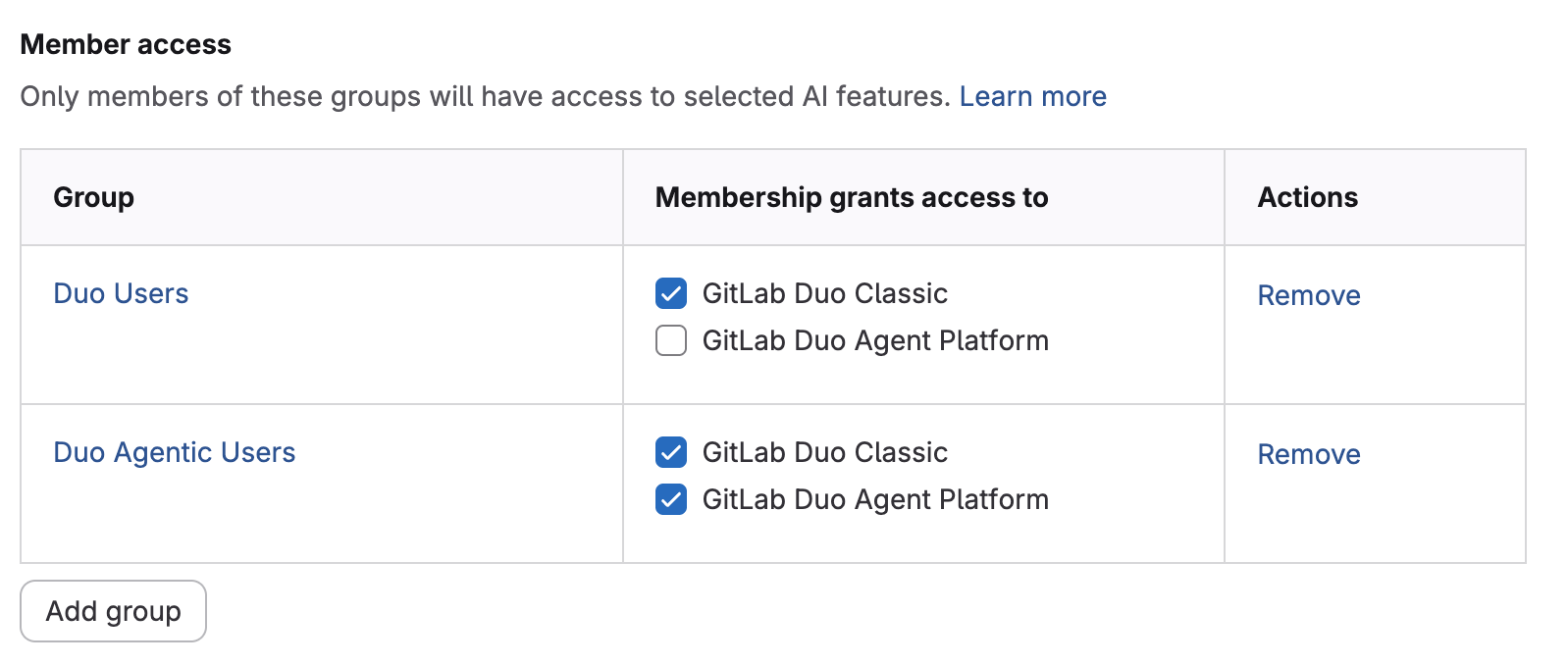
You can now define group access rules to control who can use GitLab Duo features, enabling flexible adoption strategies from immediate organization-wide access to phased rollouts.
This feature provides granular governance control so you can scale adoption at your pace while maintaining security and compliance.
The Credentials Inventory API is now available for Enterprise users on GitLab.com. This adds credential management capabilities previously only available on self-hosted instances, and enables organizations to better manage and secure their authentication tokens and keys.
The Credentials Inventory API provides programmatic access to view credentials across your organization, including:
Personal Access Tokens (PATs)
Group Access Tokens (GrATs)
Project Access Tokens (PrATs)
SSH Keys
GPG Keys
This API complements the existing Credentials Inventory UI, allowing enterprise administrators to automate credential management tasks that previously required manual intervention. With the Credentials Inventory API, you can:
Automate security workflows: Build automated processes to monitor, audit, and revoke credentials.
Enforce credential policies: Identify and revoke unused or expired tokens.
Improve security posture: Reduce the risk of credential misuse through regular auditing.
Streamline operations: Integrate credential management into your existing security tools and workflows.
GitLab Duo Agent Platform is now generally available for Duo Self-Hosted. This feature is available to GitLab Self-Managed customers with an offline license, and uses seat-based pricing.
Self-Managed administrators can configure compatible models for use with GitLab Duo Agent Platform. Administrators using AWS Bedrock or Azure OpenAI can also configure Anthropic Claude or OpenAI GPT models.
You can now turn on or off the GitLab Duo Agent Platform, including GitLab Duo Chat (Agentic), agents, and flows for a top-level group or the entire instance. When this setting is turned off, these features are not available.
Bug fixes, performance improvements, and UI improvements
At GitLab, we’re dedicated to providing the best possible experience for our users. With every release, we work tirelessly to fix bugs, improve performance, and enhance UI. Whether you’re one of the over 1 million users on GitLab.com or using our platform elsewhere, we’re committed to making sure your time with us is smooth and seamless.
Click the links below to see all the bug fixes, performance enhancements, and UI improvements we’ve delivered in 18.8.



We want to hear from you
Enjoyed reading this blog post or have questions or feedback? Share your thoughts by creating a new topic in the GitLab community forum.
Share your feedback